
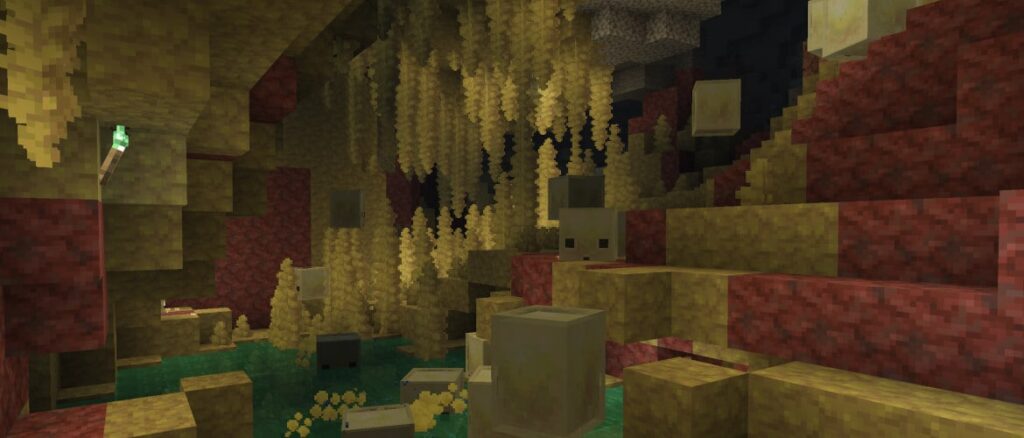
We are back again with a third snapshot for 26.2, today we are bringing you sulfur spikes to test out! These sharp blocks grow in sulfur caves, adding a colorful, pointy touch to your builds! But watch out – falling sulfur spikes sure pack a puncture!
Happy Mining!
New Features
Sulfur Spike
Is a new block that generates naturally on Sulfur blocks inside the sulfur caves biome
Forms a stalactite if placed on the ceiling or a stalagmite if placed on the floor
Can be combined to form longer stalactites & stalagmites
Stalactites and stalagmites merge if the tips are next to each other, unless you press shift while placing
Stalagmites will break if they’re not attached to something below
Stalactites fall down if not attached to something above
Being hit by a falling stalactite hurts, and they are sharp!
Thrown Tridents break Sulfur Spike
Changes
The Potent Sulfur block no longer crafts back into Sulfur blocks
Updated the textures for the following blocks:
Chiseled Cinnabar
Chiseled Sulfur
Cinnabar
Cinnabar Bricks
Polished Cinnabar
Polished Sulfur
Sulfur Bricks
Sulfur Cube mob
Can no longer be picked up by Boats
Sounds
Updated sounds for Nautilus jets and Nautilus recovers
Technical Changes
The Data Pack version is now 102.0
The Resource Pack version is now 86.0
Data Pack Version 102.0
Block Entity Data
The minecraft:bed block entity has been removed
Predicates
Entity Predicates
Entity predicate format has changed from a structure with multiple optional fields to one similar to data component maps.
For example, previously effects was an optional field:
{
“effects”: {…}
}
In this version it has become a component-like sub-predicate entry:
{
“minecraft:effects”: {…}
}
The main functional changes are:
All keys in entity predicates are now identifiers
Since identifiers can be written without namespace (default to minecraft namespace), existing field names are still valid
Exception: field type has been renamed to minecraft:entity_type
Unrecognized sub-predicate components are now rejected (previously unknown fields were ignored)
Existing type-specific sub-predicates have been renamed and moved to top-level.
minecraft:lightning to minecraft:type_specific/lightning
minecraft:fishing_hook to minecraft:type_specific/fishing_hook
minecraft:player to minecraft:type_specific/player
minecraft:raider to minecraft:type_specific/raider
minecraft:sheep to minecraft:type_specific/sheep
minecraft:slime to minecraft:cube_mob as it now includes Sulfur Cubes in addition to Slimes and Magma Cubes
For example:
{
“type_specific”: {
“type”: “minecraft:player”,
“looking_at”: {
“type”: “minecraft:ender_dragon”
}
}
}
becomes
{
“minecraft:type_specific/player”: {
“looking_at”: {
“minecraft:type”: “minecraft:ender_dragon”
}
}
}
Added minecraft:entity_tags entity sub-predicate
This predicate matches entity tags (i.e. ones set with the /tag command).
Fields:
any_of – optional list of strings, if present the matched entity must have at least one of the listed tags
all_of – optional list of strings, if present the matched entity must have all the listed tags
none_of – optional list of strings, if present the matched entity must have none of the listed tags
World Generation
Overworld Features
Adjusted Feature Type lake
Added field can_place_feature – Block Predicate, describes which blocks this feature can be placed on
Added field can_replace_with_air_or_fluid – Block Predicate, describes which blocks this feature can replace with air or the provided fluid block
Added field can_replace_with_barrier – Block Predicate, describes which blocks this feature can replace with the provided barrier block
Tags
Block Tags
Added #speleothems for blocks which are speleothems like Pointed Dripstone and Sulfur Spike
Resource Pack Version 86.0
Block Sprites
Added new Block textures:
block/sulfur_spike_down_base.png
block/sulfur_spike_down_frustum.png
block/sulfur_spike_down_middle.png
block/sulfur_spike_down_tip.png
block/sulfur_spike_down_tip_merge.png
block/sulfur_spike_up_base.png
block/sulfur_spike_up_frustum.png
block/sulfur_spike_up_middle.png
block/sulfur_spike_up_tip.png
block/sulfur_spike_up_tip_merge.png
Beds now use block models and textures, replacing with the respective bed’s color’s name
block/bed_down.png
block/bed_head_north.png
block/_bed_foot_east.png
block/_bed_foot_south.png
block/_bed_foot_up.png
block/_bed_foot_west.png
block/_bed_head_east.png
block/_bed_head_up.png
block/_bed_head_west.png
Item Sprites
Item Models
The minecraft:bed special model type has been removed
Fixed bugs in 26.2 Snapshot 3
MC-229057 – Picking up an axolotl with a lead attached destroys the lead
MC-277744 – Blocks with emissive textures don’t emit much light when held by endermen
MC-302496 – Glowing dragon fireballs no longer show the glowing outline
MC-307177 – Enabling JFR profiling causes the client to crash on startup
MC-307227 – Using an empty Offers NBT tag to disable trades doesn’t work after a relog/data merge
MC-307289 – Polished sulfur is named “Polished Sulfur Block”, which is inconsistent with all other polished stone blocks
MC-307291 – The game crashes when an entity with the friction_modifier attribute set to 2.5 moves
MC-307298 – Sulfur cubes with blocks inside them produce footstep sounds when moving across the ground
MC-307300 – Magma blocks held by sulfur cubes are not emissive
MC-307315 – Frogs try to eat large magma cubes now
MC-307316 – Magma cubes no longer drop magma cream
MC-307340 – The bottom face of slimes’ outer layer z-fights with the ground
MC-307347 – Releasing a sulfur cube from a bucket and killing it does not cause it to drop its held block
MC-307357 – Sulfur cubes don’t emit light when holding a glowing block
MC-307371 – The #sulfur_cube_archetype/fast_flat item tag contains pumpkin twice
MC-307405 – When picking up a leashed sulfur cube with a bucket, the lead disappears
MC-307420 – The game now renders fluid faces that should not be rendered
MC-307473 – The block breaking texture on bamboo stalks is now always displayed centered
MC-307483 – Emptying a sulfur cube bucket underwater doesn’t place the sulfur cube at the targeted block
Get the Snapshot
Snapshots are available for Minecraft: Java Edition. To install the Snapshot, open up the Minecraft Launcher and enable snapshots in the “Installations” tab.
Testing versions can corrupt your world, so please backup and/or run them in a different folder from your main worlds.
Cross-platform server jar:
Report bugs here:
Want to give feedback?