
In today’s snapshot we’re introducing the new Friends List for Java Edition, making it easier than ever to stay connected and jump into play together. Curious how it works? You can read more about Friends List here.
But that’s not all! We might be feature complete – but we have a final surprise for you! Listen to the official soundtrack for Chaos Cubed by fingerspit (Paula Ruiz) today – including the music disc Bounce!
Happy Mining!
New Features
Added a new Music Disc with the track “Bounce” by fingerspit
Added 5 new music tracks by fingerspit
Added the Friends List
Added the ability to easily play with your friends through peer-to-peer, even when you’re not on the same local network
Music
Added a new music disc:
“Bounce” by fingerspit
Has a chance of being found in Mineshaft Chest Minecarts that are located in a Sulfur Cave biome
Has a comparator output of 8 when played in a Jukebox
Added 5 new background music tracks by fingerspit:
“Shores”
“Memories”
“Nightly”
“Home”
“Ebb”
Friends List
Added a Friends List, accessible from a new Friends button on the Title Screen and the Pause Menu
The Friends list can be opened with a new key bind (default: “O”)
The Friends button shows a notification badge with the number of incoming friend requests, up to 5 (a “more” indicator is shown beyond that)
The Friends List is presented as an overlay with two tabs:
Friends: shows your current friends, lets you remove them, and lets you send a new friend request by Profile Name
Pending: shows incoming friend requests (which can be accepted or declined) and outgoing friend requests (which can be canceled)
The presence of your friends is shown under their name in the Friends List as one of the following:
“Offline”
“Online”
“In a world”
“In a joinable world”
Sending, accepting, declining, cancelling, and removing actions are confirmed in the UI and show a clear error message when the service is unreachable, rate limited, or the requested Profile Name does not exist
Friend changes that happen while the game is running are shown through toast notifications:
When a friend request is sent
When a friend request is received
When an outgoing friend request is accepted by the other player
Toasts show the other player’s face when the skin is available
The Friends List checks for updates once per minute while the Friends List is open, or every 5 minutes otherwise
The first time the Friends button is shown on the Title Screen, a confirmation dialog is presented to opt in to the Friends List
The Friends List, friend request privacy, and the Microsoft account safety settings link are managed from the new “Friends List” section in Online Options
Players that have their chat settings set to “Friends Only” on their XBox profile will only see chat messages from other players if they are friends
Known Issues
Developer’s Note: This is the first version of this system, released with a few known issues. It will be improved over the coming snapshots.
Cancelling a friend request before the receiver has accepted it can leave the receivers incoming list in a desynced state
The receiver will still see it as incoming, but when they accept it, it’ll turn into an outgoing friend request for them
Rejecting a friend request can leave the sender’s outgoing list in a desynced state
The sender also needs to cancel their friend request to get back to a properly synced state
If a player has the friend list turned on, but the “Allow Requests” setting turned off, other players can’t accept outgoing friend requests from them
If your Xbox profile chat setting is set to “Friends Only”, you cannot see your own chat messages
Peer-to-Peer
Added the ability to open singleplayer worlds to online multiplayer from the new Multiplayer Options screen
There are two paths to play with your friends
Invite to world: the host can invite friends to their world, and the invited players can accept or deny the invitation
Request to join world: players can request to join a friend’s world (if it’s open to online multiplayer), and the friend can accept or deny the request
Added new p2p_connection opt-in telemetry event
Changes
The Slow Bouncy Sulfur Cube archetype is no longer buoyant
The grass color is now less green in Sulfur Caves
Updated the Main Menu background panorama
Potent Sulfur
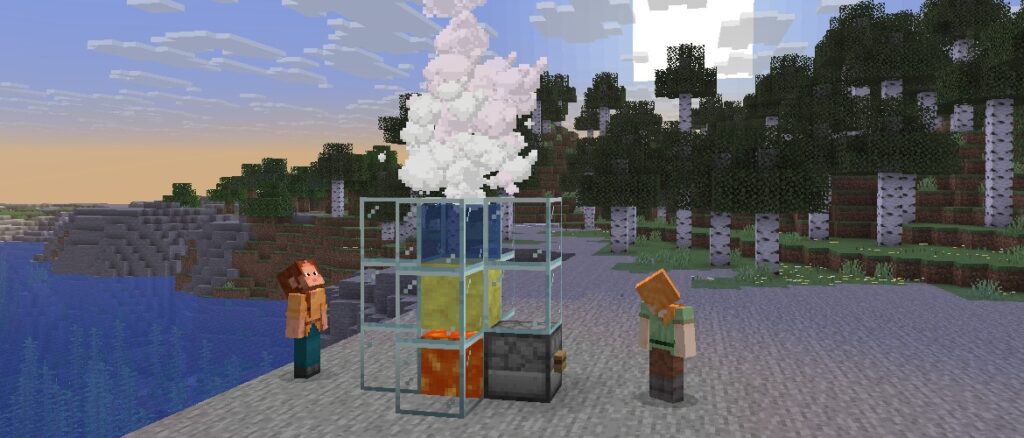
Eruption and cooldown times of Geysers are now randomized based on the position of the block and do not change if the block is replaced
Potent sulfur can now erupt when a Lava block is placed underneath
With Lava underneath, the Geyser eruption is continuous, but with slightly muted sounds compared to the eruption from a Magma block
Noxious Gas from Potent Sulfur can now rise through non-collidable waterlogged blocks and spread through other non-collidable blocks
Erupting Potent Sulfur can now emit its plume and boost entities through non-collidable blocks
This includes Scaffolding, which can be used as an alternative to Copper Grates to stand above erupting Potent Sulfur without being affected by Noxious Gas
UI
Added a Friends button to the Title Screen and the Pause Menu
Replaced the Open to LAN screen with the new Multiplayer Options screen
Multiplayer Options
This screen allows you to configure the multiplayer settings of the world you’re currently in
The multiplayer scope can be set to one of the following:
Off: (default) Nobody can join your world
Local: only players in your local network can join your world, as the Open to LAN screen used to work
Online: you can invite your friends to join your world from anywhere
The game mode and allow cheats options are also available in this screen
Settings
Added a setting to control the availability of the Friends List and its features in Online Options
Added an “In-game Notification” toggle in Online Options to control whether Friends List toasts appear while in a world
Added an “Allow Requests” toggle in Online Options to control whether other players can send you friend requests
Added an “Xbox Settings…” button in Online Options that opens the Microsoft account privacy and online safety settings
Added a Presence option in Online Options screen to control how much activity is shared with friends (default: “All”)
“All”: shares activity, and allows friends to request to join your world if opened up to online multiplayer
“Limited”: activity sharing limited to “Online” & “Offline”
“None”: no activity shared. Appearing as “Offline” to friends
Technical Changes
The Data Pack version is now 105.1
The Resource Pack version is now 87.0
Data Pack version 105.1
Block Tags
Added #causes_periodic_geyser_eruptions – all blocks that cause periodic eruptions of Potent Sulfur blocks
Added #causes_continuous_geyser_eruptions – all blocks that cause continuous eruptions of Potent Sulfur blocks
Resource Pack Version 87.0
Signs and Hanging Signs now use block models instead of built-in entity models
The text on Signs and Hanging Signs cannot be configured yet
The minecraft:signs atlas has been removed
Block Sprites
Signs and Hanging Signs now use block models and textures, replacing with the sign’s wood type (e.g. mangrove)
block/_sign.png
block/_hanging_sign.png
The process of upgrading your pack’s Bed, Sign, and Hanging Sign textures can be assisted by using this automated Slicer tool
Item Sprites
Added new Item sprites:
item/music_disc_bounce.png
UI Sprites
Added new textures for the Sign edit screen background, replacing with the sign’s wood type (e.g. mangrove):
Added new UI sprites:
gui/sprites/friends/multiplayer/invite.png
gui/sprites/friends/multiplayer/join_request.png
gui/sprites/friends/accept.png
gui/sprites/friends/accept_highlighted.png
gui/sprites/friends/cancel.png
gui/sprites/friends/friends.png
gui/sprites/friends/illustrations_00.png
gui/sprites/friends/list_separator_top.png
gui/sprites/friends/loading.png
gui/sprites/friends/reject.png
gui/sprites/friends/reject_highlighted.png
gui/sprites/friends/remove.png
gui/sprites/friends/background.png
gui/sprites/friends/button.png
gui/sprites/friends/button_disabled.png
gui/sprites/friends/button_highlighted.png
gui/sprites/friends/toast_background.png
gui/sprites/pause_menu/player_reporting.png
gui/sprites/pause_menu/bug.png
gui/sprites/pause_menu/social_interactions.png
Sounds
Added sounds for Geyser eruptions:
block.potent_sulfur.geyser_continuous_eruption
block.potent_sulfur.geyser_continuous_eruption_active
Added biome music for Sulfur Caves:
music.overworld.sulfur_caves
Item Models
The following special model types have been removed:
minecraft:standing_sign
minecraft:hanging_sign
Telemetry
New opt-in events
p2p_connection
This event is sent after a peer-to-peer connection attempt
Added new property: p2p_connection_successful
Whether the peer-to-peer connection was established successfully
Added new property: p2p_connection_failure_stage
The stage where an unsuccessful connection attempt failed, such as SIGNALING, ICE_CONNECT, or TIMEOUT
Added new property: p2p_connection_ice_path
The type of network path used for the connection, such as LOCAL, DIRECT, RELAY, or UNKNOWN
Added new properties: p2p_connection_local_candidate_type and p2p_connection_remote_candidate_type
The ICE candidate types used by each side of the connection, such as HOST, SRFLX, PRFLX, or RELAY
Added new properties: p2p_connection_total_time_ms, p2p_connection_signaling_time_ms, and p2p_connection_ice_connect_time_ms
Timing information for each stage of the peer-to-peer connection flow
Fixed bugs in 26.2 Snapshot 7
MC-297491 – Glyphs from TTF files are no longer rendered correctly on glow signs
MC-306401 – Shulkers’ name tags display inside them when they’re open
MC-306972 – Wardens repeatedly roar in place when detecting ghasts
MC-307144 – The game reads world generation data from data packs or world_gen_settings.dat inconsistently, preventing updating large biome sources
MC-307221 – The missing texture is no longer used for blocks with no model or an invalid model
MC-307272 – Servers can no longer detect left clicks from players in Spectator mode
MC-307336 – Colors are less saturated with the Vulkan rendering backend on some Mac systems
MC-307339 – The player’s vertical motion is reset when moving on the ground
MC-307387 – When using Vulkan, the Globals uniform is not available in multiple core shaders unless explicitly defined
MC-307418 – The game crashes when trying to upgrade a legacy world
MC-307421 – Vulkan does not trigger an error when a resource pack that cannot be loaded is loaded
MC-307442 – The game crashes upon startup on Mac systems with Intel graphics of Gen8 architecture
MC-307455 – The game crashes when minimized on some Intel graphics
MC-307498 – The standing_sign special model renderer uses a field misspelled as “attachement”
MC-307499 – The game crashes upon detecting invalid shader files during loading
MC-307585 – The fall_after_explosion advancement trigger does not work with TNT anymore
MC-307605 – The “Exclusive Fullscreen” and “Graphics API” options prompt the user to restart the game differently
MC-307817 – Target selectors no longer allow specifying type multiple times when using tags
MC-307877 – Bone meal cannot be used on dry grass with a block directly above it
MC-307905 – Crash report generation can crash when StackTraceElement.getFileName() is null
MC-307912 – Sulfur spikes in sulfur springs are not waterlogged
MC-307919 – Geysers’ force goes through some transparent blocks
MC-307920 – Bucketed sulfur cubes can despawn
MC-307929 – Dispensers can equip armor on sulfur cubes
MC-307952 – The enchantment glint does not render on top of banner patterns applied on a shield
Get the Snapshot
Snapshots are available for Minecraft: Java Edition. To install the Snapshot, open up the Minecraft Launcher and enable snapshots in the “Installations” tab.
Testing versions can corrupt your world, so please backup and/or run them in a different folder from your main worlds.
Cross-platform server jar:
Report bugs here:
Want to give feedback?