
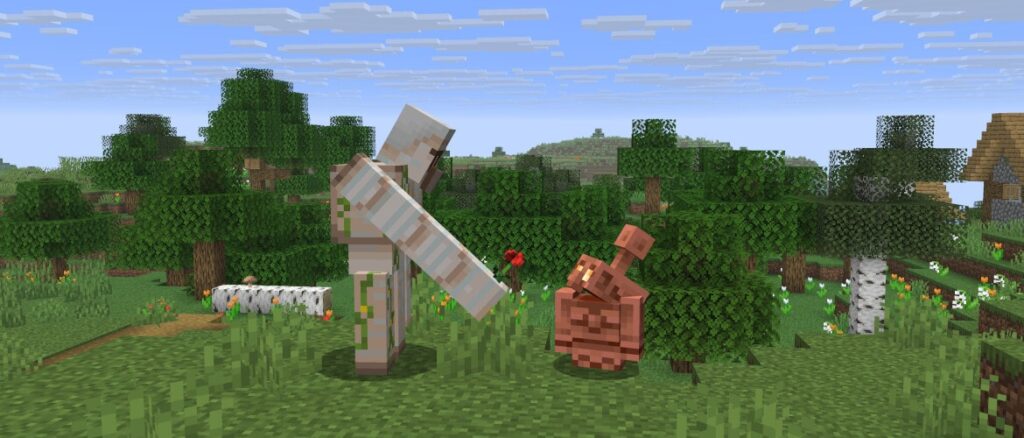
In this week’s snapshot we’ve got a nice quality of life improvement for all the chatters out there. Now your unsent messages will be saved as drafts, check out the details below. Items on shelves will now be positioned in the middle of the shelf as default. Before we move our focus onto technical tweaks and bug fixes for this drop, we have one final feature to announce – and it involves a very cute interaction between the copper golem and the iron golem! With this, all features for our third game drop of 2025 are now in testing, and we’ll start working our next game drop, which we are excited to tell you about soon!
New Features
Added light flashes to The End dimension as part of the ongoing Vibrant Visuals work
Iron Golems will sometimes plant a decorative flower onto a nearby Copper Golem
Unsent chat messages now get saved as chat drafts
The End Light Flashes
The End dimension now has skylight
Normally the skylight does not affect how the dimension looks
From time to time flashes in the sky happen
When they happen skylight intensity increases flooding the dimension with purple light
Copper Golem
Iron Golems will sometimes plant a decorative flower onto a nearby Copper Golem
The flower can be removed with Shears
This flower is dropped when the Copper Golem turns into a Copper Golem Statue Block
Chat Drafts
Unsent chat messages now get saved as chat drafts if the chat was forcibly closed
This includes it being closed by external sources such as dying or a dialog opening, but not the player intentionally closing their chat
Any existing chat draft will get pre-filled into the message box the next time the chat is opened
Draft text has a grayed-out appearance until fully restored
Draft text can be restored as regular text by interacting with it:
Typing additional text
Moving the text cursor using the arrow keys
Clicking it
Highlighting it
Pressing enter on a chat draft prior to it being restored sends it like a normal chat message
Pressing backspace on a chat draft prior to it being restored deletes it
Added an option to the Chat Settings menu that enables saving unsent chat messages by default
With this option enabled, unsent messages will always get saved as chat drafts, even if the player intentionally closed their chat
Changes
Players seen in the game world of the current server are now always shown in the Social Interactions screen even if they are offline
Blocks
Shelf
Items in the Shelf will render in the middle of the Shelf
Updated the sizes of many items in the Shelf to better fit the Shelf
Developer’s Note: Thank you for all your valuable feedback on the shelf! Seeing the many creative ways you’ve been using this new block, we’ve decided to revert the change from last week that positioned items at the bottom of the shelf, as we agree that having the items centered provides more creative opportunities when building.
UI
Chat
It is now possible to start chatting while standing inside a Nether Portal
The chat will now remain open and unchanged if the player was chatting before being transferred to another dimension
Technical Changes
The Data Pack version is now 83.1
The Resource Pack version is now 65.2
Added new display transform “on_shelf”
Used for displaying items on the Shelf
Data Pack Version 83.1
Block States
Added align_items_to_bottom block state property to the Shelf block
If false the items on the Shelf will ignore the vertical translation of the on_shelf item display transform and will be rendered vertically aligned to the middle of the Shelf
If true the items on the Shelf will be rendered upward from the bottom of the Shelf and will respect the vertical translation of the on_shelf item display transform
Default is false (items are aligned to the middle of the Shelf)
Attributes
run_command Click Event
Previously, if the command field contained a command that required a signed message (/say, /me, /msg, /tell, /w, /teammsg, /tm), it would be silently discarded
Instead, a screen will be shown that lets the user insert the command into the chat window or copy the command to their clipboard if the chat window can’t be opened
Enchantments
explode Effects
New field: block_effects – specifies per-block particles. Each block particle is randomly chosen according to weights. A set limit of block particles is spawned each tick from all explosions that tick.
Format: List of entries:
weight: Non-negative integer representing the random weight for this entry being chosen
particle: The particle to spawn
scaling: Optional scaling to apply between explosion center and block position, or 1.0 if not specified
speed: Optional scaling to apply to the speed of the particle, or 1.0 if not specified
Tags
Item Tags
Added #shearable_from_copper_golem – all items that can be removed from the Copper Golem’s head slot via Shears
Resource Pack Version 65.2
Textures
Added a new texture:
environment/end_flash.png
Sounds
Sound Events
Fixed bugs in 25w33a
MC-26334 – Chat UI is forcibly cleared when killed
MC-46503 – You can retain entities’ shaders by running the “/kill” command while in spectator mode
MC-69216 – Switching to spectator mode while fishing keeps rod cast
MC-98322 – Flying after shifting between Creative/Spectator
MC-99785 – You can leash entities in spectator mode
MC-119417 – A spectator can occupy a bed if they enter it and then are switched to spectator mode
MC-165991 – TNT explosion no longer shows additional smoke particles since 1.15 Pre-release 1
MC-173730 – Shift-clicking water buckets against a waterloggable block doesn’t place the water beside the waterloggable block
MC-183784 – Visual bug to the Game Mode Switcher debug menu after resizing the window
MC-187850 – “run_command” click_event doesn’t work in written books if chat is hidden
MC-191669 – Sprinting is disabled when switching your gamemode to spectator while sprinting into a block or general obstruction
MC-232968 – Spectators can prevent the closing animation of a chest/barrel when viewing it at the same time as a non-spectator
MC-238146 – When you switch to Spectator mode while sleeping, the night never skips
MC-259571 – Last player game mode not saved after player dies or the game is reloaded
MC-270172 – Client and server desync for hooked players when changing gamemode to spectator
MC-297898 – Entering a dialog temporarily closes the chat and clears anything the player was currently typing
MC-299548 – “run_command” dialog actions don’t work if chat is hidden
MC-299823 – Minecraft shaders cause C7050 warnings
MC-299873 – Selection boxes of plain messages within dialogs can get cut off
MC-300034 – Dolphins can ride boats
MC-300057 – Monsters still spawn for a tick when spawning them with a Spawn Egg in Peaceful
MC-300417 – The copper pickaxe is not part of the #cluster_max_harvestables item tag
MC-300457 – Dialog is unescapable when action or exit_action is set to run_command with a command that would produce a signed chat message
MC-300722 – Hoppers appear to randomly stop draining items through shelves
MC-300732 – Loaded ender pearls are deleted when viewing the end credits for the first time when enderPearlsVanishOnDeath is true
MC-300739 – Server crash when generating custom structures containing shelf blocks
MC-300746 – Missing translation for copper wall torch
MC-300747 – Cannot see villager’s profession layer behind slime
Get the Snapshot
Snapshots are available for Minecraft: Java Edition. To install the Snapshot, open up the Minecraft Launcher and enable snapshots in the “Installations” tab.
Testing versions can corrupt your world, so please backup and/or run them in a different folder from your main worlds.
Cross-platform server jar:
Report bugs here:
Want to give feedback?